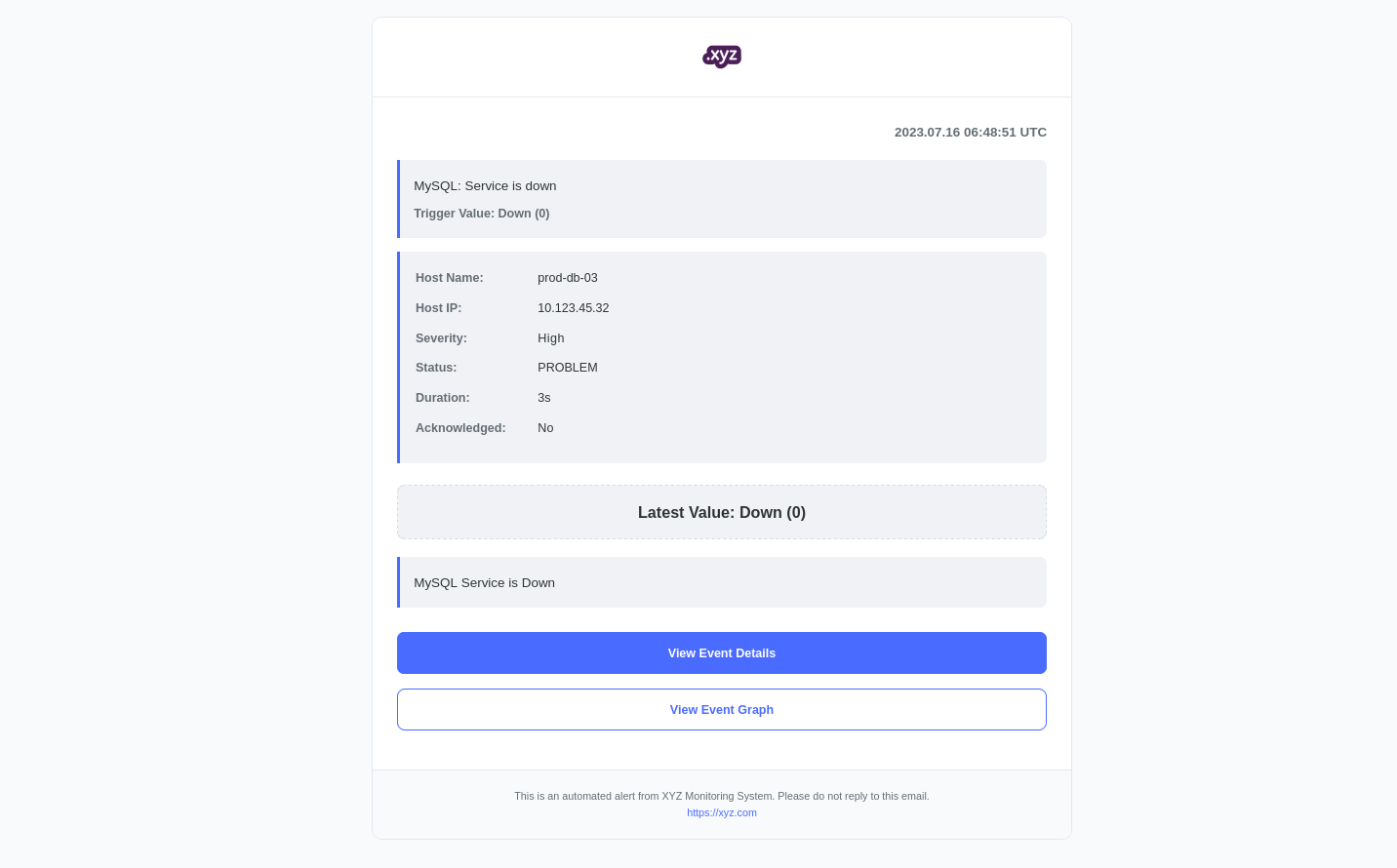
Zabbix provides powerful alerting features, and customizing email templates can significantly improve readability and response efficiency. Below is a fully styled HTML email template tailored for modern alerts with branding and visual enhancements.
Key Edits Before Deployment
Before using this template, make sure to update the following parts:
Replace all instances of zabbix_server with an actual Zabbix server hostname or IP. There are 4 instances of the zabbix_server string on the html template:
<a href="http://zabbix_server/zabbix/tr_events.php?triggerid={TRIGGER.ID}&eventid={EVENT.ID}" class="button button-primary">View Event Details</a>
<a href="http://zabbix_server/zabbix/history.php?action=showgraph&itemids%5B%5D={ITEM.ID}" class="button button-secondary">View Event Graph</a>
<p><a href="https://zabbix_server" style="color: #4a6bff; text-decoration: none;">https://zabbix_server</a></p>
Replace the company name in the title tag and footer paragraph tag
<title>{{ Company_Name }} Monitoring Alert</title>
<p>This is an automated alert from Company_Name System. Please do not reply to this email.</p>
Replace the company logo path and alt text in the image tag of logo-header section
<img src="https://company.com/logo_path" alt="company_logo" class="logo" />
Set the email subject to the following format for clarity:
[{HOST.NAME}] {EVENT.NAME}
Features of the Template
- Responsive design with mobile support.
- Color-coded severity levels.
- Clean layout with key event and trigger details.
- Two action buttons: “View Event Details” and “View Event Graph”.
- Branding section for logo and footer message.
HTML Template Code
Below is the full HTML code.
<!DOCTYPE html PUBLIC "-//W3C//DTD XHTML 1.0 Transitional//EN" "http://www.w3.org/TR/xhtml1/DTD/xhtml1-transitional.dtd">
<html xmlns="http://www.w3.org/1999/xhtml">
<head>
    <meta http-equiv="Content-Type" content="text/html; charset=utf-8" />
    <meta name="viewport" content="width=device-width, initial-scale=1.0" />
    <title>{{ Company_Name }} Monitoring Alert</title>
    <style type="text/css">
        /* Reset styles for email clients */
        body, p, div, h1, h2, h3, h4, h5, h6 {
            margin: 0;
            padding: 0;
        }

        body {
            font-family: Arial, Helvetica, sans-serif;
            line-height: 1.6;
            color: #2d3436;
            background-color: #f8fafc;
            padding: 20px 0;
        }

        .container {
            width: 100%;
            max-width: 800px;
            margin: 0 auto;
            background-color: #ffffff;
            border-radius: 12px;
            -webkit-border-radius: 12px;
            -moz-border-radius: 12px;
            border: 1px solid #e2e8f0;
            overflow: hidden;
        }

        .logo-header {
            padding: 20px;
            background-color: white;
            border-bottom: 1px solid #e2e8f0;
            text-align: center;
        }

        .logo {
            max-height: 50px;
            max-width: 180px;
            height: auto;
        }

        .alert-header {
            padding: 24px;
            text-align: center;
            background: #4a6bff;
            background: -webkit-linear-gradient(135deg, #4a6bff 0%, #3a56cc 100%);
            background: -moz-linear-gradient(135deg, #4a6bff 0%, #3a56cc 100%);
            background: -o-linear-gradient(135deg, #4a6bff 0%, #3a56cc 100%);
            background: linear-gradient(135deg, #4a6bff 0%, #3a56cc 100%);
            color: white;
        }

        .alert-header h1 {
            margin: 0;
            font-size: 22px;
            font-weight: bold;
            letter-spacing: 0.5px;
        }

        .content {
            padding: 28px;
        }

        .alert-details {
            background-color: #f1f2f6;
            border-left: 4px solid #4a6bff;
            padding: 18px;
            margin-bottom: 24px;
            border-radius: 0;
            -webkit-border-radius: 0 8px 8px 0;
            -moz-border-radius: 0 8px 8px 0;
        }

        .severity-High {
            border-left-color: #ff4757;
            background-color: #fdecea;
        }

        .severity-Average {
            border-left-color: #ffa502;
            background-color: #fff3e8;
        }

        .severity-Warning {
            border-left-color: #ffc107;
            background-color: #fff9e6;
        }

        .severity-Information {
            border-left-color: #1e90ff;
            background-color: #e8f6f8;
        }

        .severity-not-classified {
            border-left-color: #636e72;
            background-color: #f8f9fa;
        }

        .detail-row {
            margin-bottom: 12px;
            overflow: hidden;
        }

        .detail-label {
            font-weight: bold;
            width: 140px;
            float: left;
            color: #636e72;
            font-size: 14px;
        }

        .detail-value {
            margin-left: 140px;
            font-size: 14px;
        }

        .severity-badge {
            display: inline-block;
            border-radius: 12px;
            -webkit-border-radius: 12px;
            -moz-border-radius: 12px;
            letter-spacing: 0.5px;
        }

        .badge-High {
            color: #ff4757;
        }

        .badge-Average {
            color: #ffa502;
        }

        .badge-Warning {
            color: #ffc107;
        }

        .badge-Info {
            color: #1e90ff;
        }

        .badge-default {
            color: #636e72;
        }

        .button-container {
            margin-top: 28px;
        }

        .button {
            display: block;
            padding: 12px 24px;
            border-radius: 8px;
            -webkit-border-radius: 8px;
            -moz-border-radius: 8px;
            text-decoration: none;
            font-weight: bold;
            text-align: center;
            margin-bottom: 16px;
            font-size: 14px;
            border: 1px solid #4a6bff;
        }

        .button-primary {
            background-color: #4a6bff;
            color: white;
        }

        .button-secondary {
            background-color: white;
            color: #4a6bff;
        }

        .footer {
            text-align: center;
            padding: 20px;
            font-size: 12px;
            color: #636e72;
            border-top: 1px solid #e2e8f0;
            background-color: #f8fafc;
        }

        .timestamp {
            font-size: 15px;
            color: #636e72;
            margin-bottom:   20px;
            text-align: right;
            font-weight: bold;
        }

        .value-display {
            font-size: 18px;
            font-weight: bold;
            color: #2d3436;
            padding: 16px;
            background-color: #f1f2f6;
            border-radius: 8px;
            -webkit-border-radius: 8px;
            -moz-border-radius: 8px;
            text-align: center;
            margin: 20px 0;
            border: 1px dashed #cbd5e1;
        }

        .event-description {
            font-size: 15px;
            margin: 16px 0;
            padding: 16px;
            border-left: 4px solid #4a6bff;
            background-color: #f1f2f6;
            border-radius: 0;
            -webkit-border-radius: 0 8px 8px 0;
            -moz-border-radius: 0 8px 8px 0;
            line-height: 1.7;
        }

        .event-value {
            font-size: 14px;
            color: #636e72;
            margin-top: 8px;
            font-weight: bold;
        }

        /* Mobile styles */
        @media screen and (max-width: 640px) {
            .container {
                border-radius: 0;
                -webkit-border-radius: 0;
                -moz-border-radius: 0;
                border-left: none;
                border-right: none;
            }

            .detail-label {
                width: 100%;
                float: none;
                margin-bottom: 4px;
            }

            .detail-value {
                margin-left: 0;
            }

            .content {
                padding: 20px;
            }
        }
    </style>
</head>
<body>
    <!--[if (gte mso 9)|(IE)]>
    <table width="800" align="center" cellpadding="0" cellspacing="0" border="0">
    <tr>
    <td>
    <![endif]-->

    <div class="container">
        <!-- Company Logo Section -->
        <div class="logo-header">
            <img src="https://company.com/logo_path" alt="company_logo" class="logo" />
        </div>

        <div class="content">
            <div class="timestamp">
                {EVENT.DATE} {EVENT.TIME} UTC
            </div>

            <div class="event-description">
                {EVENT.NAME}
                <div class="event-value">
                    Trigger Value: {EVENT.OPDATA}
                </div>
            </div>

            <div class="alert-details severity-{EVENT.SEVERITY}">
                <div class="detail-row">
                    <div class="detail-label">Host Name:</div>
                    <div class="detail-value">{HOST.NAME}</div>
                </div>

                <div class="detail-row">
                    <div class="detail-label">Host IP:</div>
                    <div class="detail-value">{HOST.IP}</div>
                </div>

                <div class="detail-row">
                    <div class="detail-label">Severity:</div>
                    <div class="detail-value">
                        <span class="severity-badge badge-{EVENT.SEVERITY}">{EVENT.SEVERITY}</span>
                    </div>
                </div>

                <div class="detail-row">
                    <div class="detail-label">Status:</div>
                    <div class="detail-value">{EVENT.STATUS}</div>
                </div>

                <div class="detail-row">
                    <div class="detail-label">Duration:</div>
                    <div class="detail-value">{EVENT.AGE}</div>
                </div>

                <div class="detail-row">
                    <div class="detail-label">Acknowledged:</div>
                    <div class="detail-value">{EVENT.ACK.STATUS}</div>
                </div>
            </div>

            <div class="value-display">
                Latest Value: <strong>{ITEM.VALUE}</strong>
            </div>

            <div class="event-description">
                {TRIGGER.DESCRIPTION}
            </div>

            <div class="button-container">
                <a href="http://zabbix_server/zabbix/tr_events.php?triggerid={TRIGGER.ID}&eventid={EVENT.ID}" class="button button-primary">View Event Details</a>
                <a href="http://zabbix_server/zabbix/history.php?action=showgraph&itemids%5B%5D={ITEM.ID}" class="button button-secondary">View Event Graph</a>
            </div>
        </div>

        <div class="footer">
            <p>This is an automated alert from Company_Name System. Please do not reply to this email.</p>
            <p><a href="https://zabbix_server" style="color: #4a6bff; text-decoration: none;">https://zabbix_server</a></p>
        </div>
    </div>

    <!--[if (gte mso 9)|(IE)]>
    </td>
    </tr>
    </table>
    <![endif]-->
</body>
</html>
Example Output
Here’s what your alert email might look like: